AD Publications
AD Publications
- No Agency Commission Allowed Flag - AD Publications -> INET.NO.COMM.IND <475>
- Hide Zero Value Lines on Invoices - AD Publications -> HIDE.ZERO.LINE.ON.INV <658> When blank it is equivalent to N
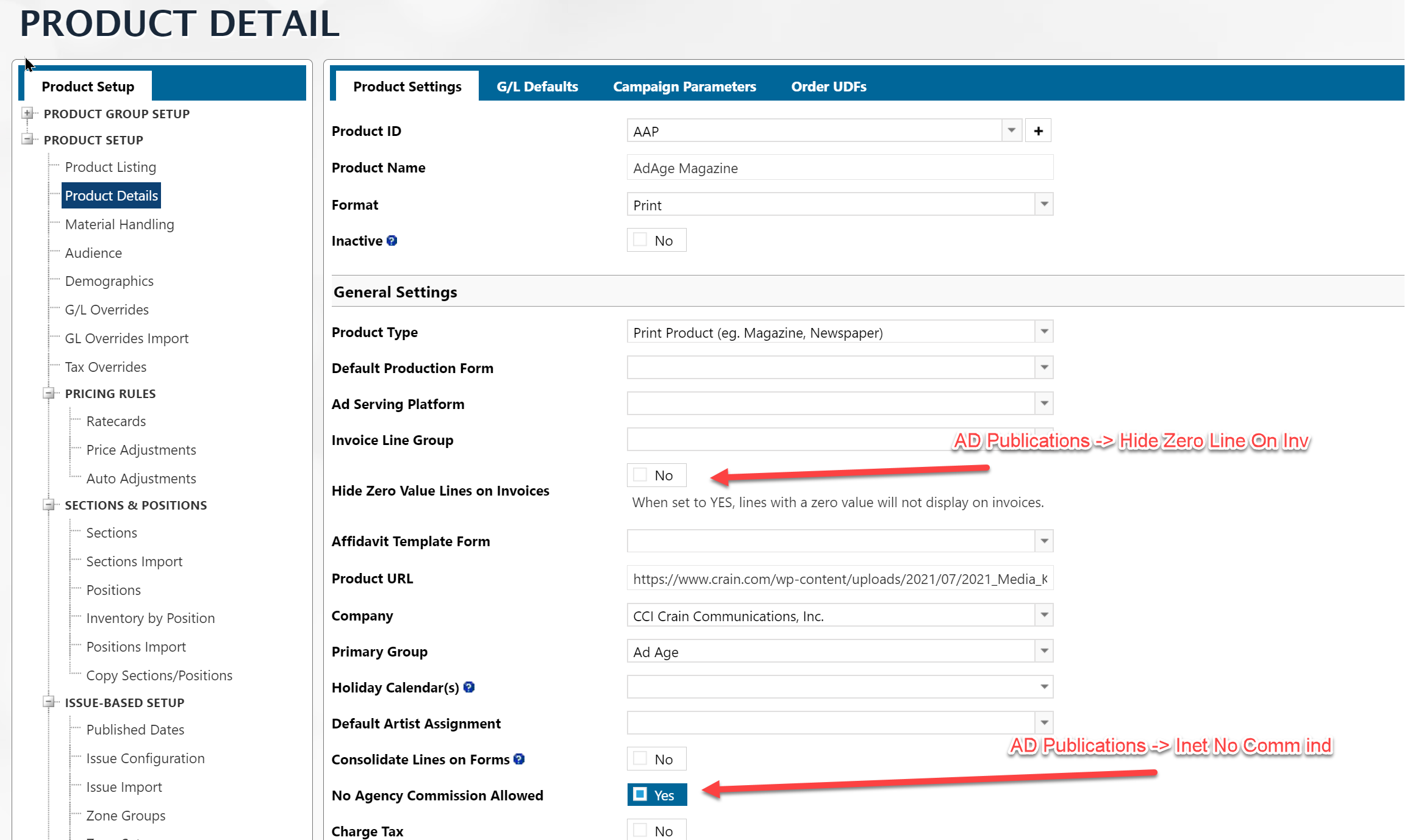
Product Type
The Product type (first option under General Settings), can be one of four options. There are three flags involved in this setting:
- AD Publications -> PRINT.PUB.IND <536> - If equal to Y, the Print Product
- AD Publications -> ENEWS>IND <386> - If equal to Y, the Date or Issue-Based
- AD Publications -> INET.RON.IND <371> - If equal to Y, the Group Product
- If all above are Null, then Standard Product
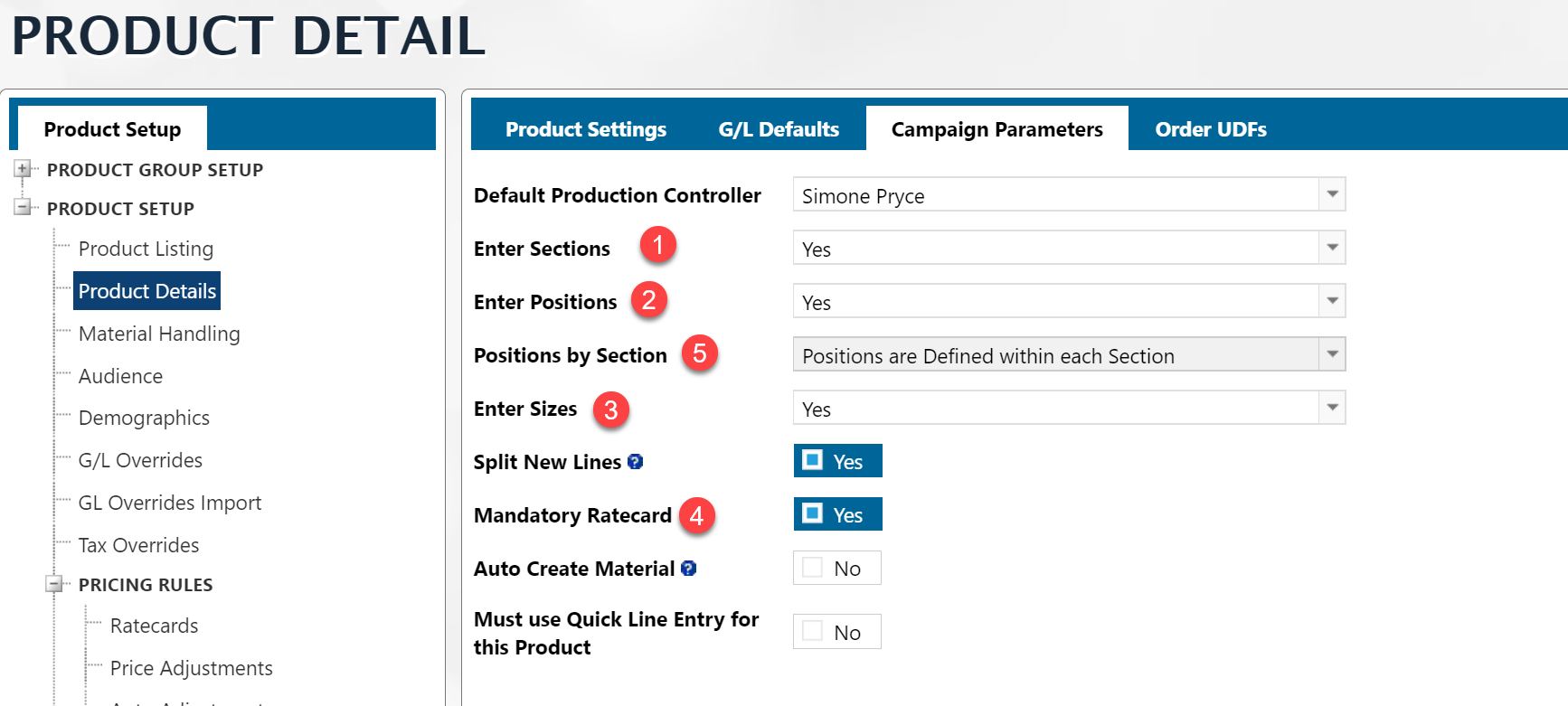
Campaign Parameters
- AD Publications -> INET.ENTER.SECTION <379>
- AD Publications -> INET.ENTER.POS<380>
- AD Publications -> INET.ENTER.SIZE<381>
- AD Publications -> INET.REQ.RC <382>
- AD Publications -> INVENTORY.NO.SECTIONS.IND <560> -
- "Y" - Positions are Defined Independent of Section
- "N" - Positions are Defined within each Section
Positions and Sections
Sections/Positions can be complicated outside of the orders.
You can define sections that are dependent on a Position or not.
Either way the tables for the set up data are:
AD Internet Sections AD Internet Positions
Also, in AD Publications there is a flag.
AD Publications -> INVENTORY.NO.SECTIONS.IND <560> -
- "Y" - Positions are Defined Independent of Section
- "N" - Positions are Defined within each Section
- Blank - Positions are Defined within each Section
https://nnn.navigahub.com/EW/DEVDIGITAL/ad/setup/website_details?ID=PRODID**

BUT, you cannot get to Positions or Sections from AD Publications. You need to start your report with either AD Internet Sections or AD Internet Positions.
Both of these mappings have a link to the AD Publications table.
Material Lead / Closing / etc
If you are looking for Material Lead Time and Closing Days and Overrides by Ad Type, you will want to look in the AD Publications mappings.
| # | Field Label | File Name | Value | Multivalued? |
|---|---|---|---|---|
| 1 | In Mat Due Days | IN.MAT.DUE.DAYS | 412 | — |
| 2 | Dflt Mat Closing Time | DFLT.MAT.CLOSING.TIME | 234 | — |
| 3 | Close Date Mat | CLOSE.DATE | 17 | M |
| 4 | Close Time | CLOSE.TIME | 590 | M |
| 5 | Artwork Type Date Overrides | ARTWORK.TYPE.DATE.OVERRIDES | 678 | MS |
| 6 | Ad Type Override ID | AD.TYPE.OVERRIDE.ID | 632 | MS |
| 7 | Ad Type Override Sections | AD.TYPE.OVERRIDE.SECTIONS | 657 | MS |
| 8 | Ad Type Override Tree | AD.TYPE.OVERRIDE.TREE | 640 | M |
| 9 | Ad Type Override Day Nos | AD.TYPE.OVERRIDE.DAY.NOS | 641 | MS |
| 10 | Ad Type Override Mat Days | AD.TYPE.OVERRIDE.MAT.DAYS | 635 | M |
| 11 | Ad Type Overrides Days | AD.TYPE.OVERRIDE.DAYS | 633 | M |
| 11 | Ad Type Override Time | AD.TYPE.OVERRIDE.TIME | 634 | M |

