JOIN-UDF Descriptions
Type: Other
This dataset contains the needed fields so that you can get the UDF Descriptions for Picklist fields.
This dataset contains the needed fields so that you can get the UDF Descriptions for Picklist fields.
Bundle (TGZ): JOIN-UDF Descriptions
Definition JSON: join-udf-descriptions.json
Summary
This dataset contains the needed fields so that you can get the UDF Descriptions for Picklist and Text fields. These are the two types of UDFs that could have a description associated with their value.
To use this dataset as a lookup, you will need to understand how to join to an existing report properly.
First, understand that UDFs are associated with certain areas of the system. Here are the four primary areas for UDFs. We call these the
UDF Identifiers
- Client AR UDFs - Located in GEN Clients -> https://naviga-informer-docs.netlify.app/docs/informer/informer-mappings-udf-fields#client-ar-udf
- UDF Identifier = AR
- CRM UDFs - Located in CM Prospects Control -> https://naviga-informer-docs.netlify.app/docs/informer/informer-mappings-udf-fields#crm-udf
- UDF Identifier = CRM
- Campaign UDFs - Located in AD Internet Campaigns -> https://naviga-informer-docs.netlify.app/docs/informer/informer-mappings-udf-fields#campaign-udf
- UDF Identifier = INET
- Order Line UDFs - Located in AD Internet Orders -> https://naviga-informer-docs.netlify.app/docs/informer/informer-mappings-udf-fields#order-line-udf
- UDF Identifier = INET.LINE
- Opportunity UDFs - Located in CM Opportunities -> https://naviga-informer-docs.netlify.app/docs/informer/informer-mappings-udf-fields#opportunity-udf
- UDF Identifier = OPP
Joining to Other Reports
Picklists and Text UDFs will have description associated with the Value you find in the the mapping. To be able to get the description for these UDF values, you will need to create a join key that will join your report to this dataset.
The example flow steps below are ones that will need to be in the report that is joining to the JOIN-UDF Descriptions.
We will be getting the UDF Picklist 1 & 2 description from AD Internet Orders. The Picklist in AD Internet Orders are unique in that the are Multivalued/Subvalued fields (Arrays of Arrays).This means that we must first run them through a normalize step so that they exist as single arrays before we can do our lookups.
In the Powerscript below, notice that we are using the JavaScript map function to loop through the picklist values and create a unique key to join to our JOIN-UDF Descriptions dataset.
Picklists
$record.udfPicklist1Key = ""
$record.udfPicklist2Key = ""
if ($record['udfPicklist1']) {
	$record.udfPicklist1Key = $record['udfPicklist1'].map(el => (`INET.LINE*PICKLIST*1-${el}`))
}

if ($record['udfPicklist2']) {
	$record.udfPicklist2Key = $record['udfPicklist2'].map(el => (`INET.LINE*PICKLIST*2-${el}`))
}
Here is what the Flow Steps may look like:
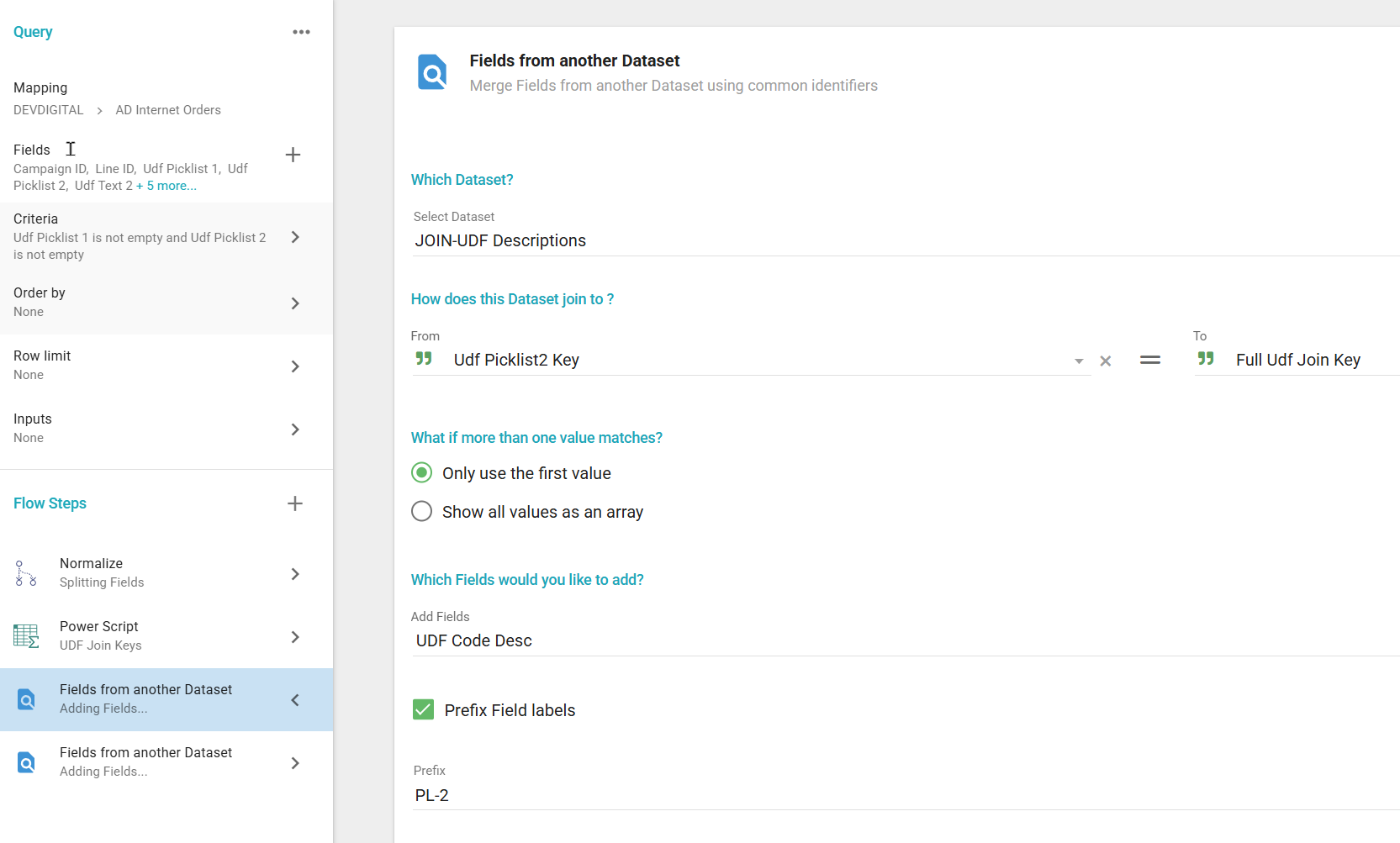
Description
This dataset contains the needed fields so that you can get the UDF Descriptions for Picklist fields.
Fields
| Label | Alias | Type | Hidden | Description |
|---|---|---|---|---|
| UDF Key | id | keyword_text | The UDF Identifier <UDF Identifier><UDF Type><UDF Position> | |
| Udf Identifier | UDFIdentifier | keyword_text | What data the UDFs are associated with. Here are the options: AR - Client AR UDFs - https://naviga-informer-docs.netlify.app/docs/informer/informer-mappings-udf-fields#client-ar-udf CRM - CRM UDFs - https://naviga-informer-docs.netlify.app/docs/informer/informer-mappings-udf-fields#crm-udf INET - Campaign UDFs - https://naviga-informer-docs.netlify.app/docs/informer/informer-mappings-udf-fields#campaign-udf INET.LINE - Order Line UDFs - https://naviga-informer-docs.netlify.app/docs/informer/informer-mappings-udf-fields#order-line-udf OPP - Opportunity UDFs - https://naviga-informer-docs.netlify.app/docs/informer/informer-mappings-udf-fields#opportunity-udf | |
| Udf Type | UDFType | keyword_text | We are only concerned with PICKLIST and TEXT for this dataset. The full list is: PICKLIST DATE NUMERIC TEXT | |
| Udf Position | UDFPosition | keyword_text | This will be the position of the UDF. For example: UDF_PICKLIST_1 where 1 is the position. | |
| UDF Code | udfCode | keyword_text | A code identifying the picklist or text value | |
| UDF Code Desc | udfCodeDes | keyword_text | The description of the UDF Code. This is what people will want to see. | |
| Full Udf Join Key | fullUDFJoinKey | keyword_text |