NAVIGA-AR Cash Receipts Register
Type: AR and GL
Payments report from AR Cash
Payments report from AR Cash
Bundle (TGZ): NAVIGA-AR Cash Receipts Register
Definition JSON: naviga-ar-cash-receipts-register.json
Summary
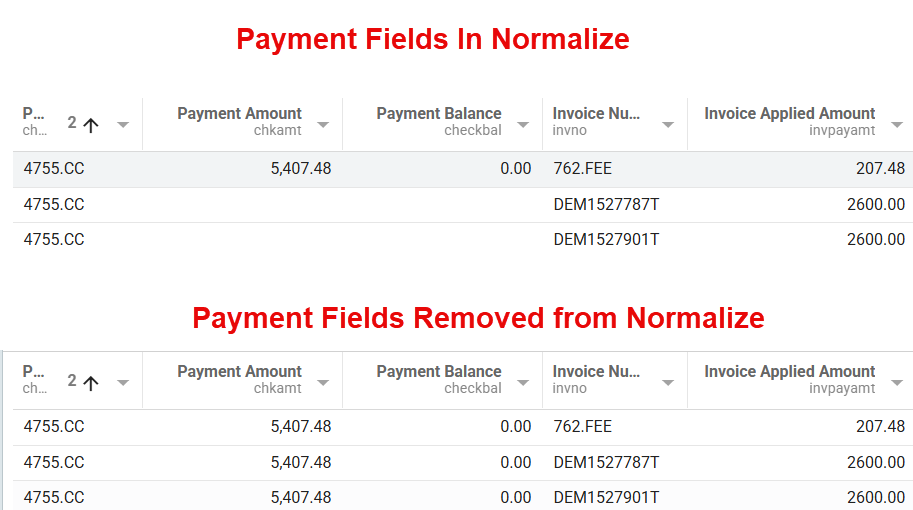
This report will return payments along with the invoices that the payments were applied to. Since a payment can be applied to multiple invoices, this will result in a payment showing up on multiple rows in the report, one for each Invoice it was applied to.
To keep you from overstating total payment amounts when aggregating, we only show the payment amount on the first row.
If you want to see the payment fields show up on every row, simply remove the following field marked with a red X from the Normalize step:
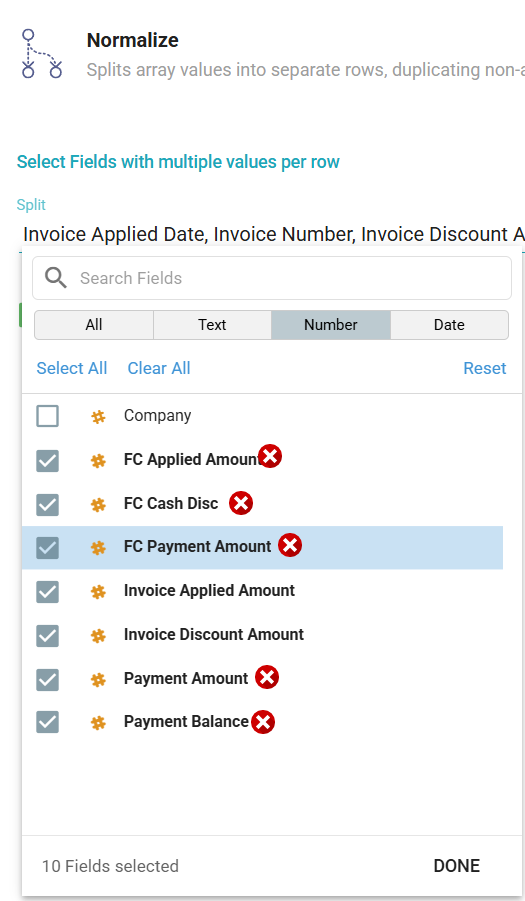
See below to view the difference between having the fields in the normalize versus not having them in the normalize. When removed, notice that the payment amount will be duplicated for each invoice. This is fine if you understand that, but if you were to create an aggregation on the Payment amount field in the second example, you would overstand the total payment amount.
Description
Report showing AR Payments from AR Cash mapping along with the invoices those payments have been applied to.
Fields
| Label | Alias | Type | Hidden | Description |
|---|---|---|---|---|
| Company | company | double | ||
| Batch Number | batchno | keyword_text | ||
| Client ID | clientId | keyword_text | ||
| Client Name | clientName | keyword_text | ||
| Payment ID | checkNo | keyword_text | Payment Identifier. Called the Check No field in the mapping. | |
| Bank | bankcode | keyword_text | Bank Code | |
| Financial Period | period | keyword_text | Financial Period | |
| Check Date | checkdate | date | ||
| Payment Amount | chkamt | double | Total amount of the Payment. Since we are also pulling in invoices that this payment was applied to, there could be multiple rows for the same payment. We only show the payment amount on the first row, so it only shows up once in the output. If you want to change this and have it show up on every row, remove the Payment Amount field from the Normalize step. | |
| Payment Balance | checkbal | double | Unapplied payment. | |
| Invoice Number | invno | keyword_text | Invoice Number. Link to AR Invoices ID field. | |
| Invoice Discount Amount | invdiscamt | double | ||
| Invoice Applied Amount | invpayamt | double | Amount applied to the Invoice | |
| Invoice Applied Date | invPayDate | date | Date payment was applied to Invoice | |
| Invoice Doc Type | invoice_id_assoc_docType | keyword_text | I = Invoice C = Credit W = Write Off D = Debit | |
| FC Payment Amount | fcchkamt | double | Foreign currency payment amount. Only populated if payment in a foreign currency. | |
| FC Cash Disc | fccshdisc | double | Foreign currency cash discount amount. | |
| FC Applied Amount | fcpayamt | double | Foreign currency applied amount | |
| Currency Code | curCode | keyword_text |