NAVIGA-AD Internet Orders Actual GL Split
Type: Campaigns
Returns GL Revenue allocation values by Sub Orders
Returns GL Revenue allocation values by Sub Orders
Bundle (TGZ): NAVIGA-AD Internet Orders Actual GL Split
Definition JSON: naviga-ad-internet-orders-actual-gl-split.json
Summary
This report reads from new fields (2026) in AD Internet Orders mapping.
- GL Rev Amt - The revenue amounts for each GL Code in the GL Codes field.
- GL Rev Codes - The GL Codes to be applied to the revenue Amounts
- GL Rev Source - The rules that the GL Split using
- GL Comm Amt - The commission amounts for each GL Code in the GL Comm Codes field.
- GL Comm Codes - The GL Codes to be applied to the commission Amounts
- GL Comm Source - The rules that the GL Comm Split using
Below is an image of where you will see the Revenue G/L Allocations in a Campaign.
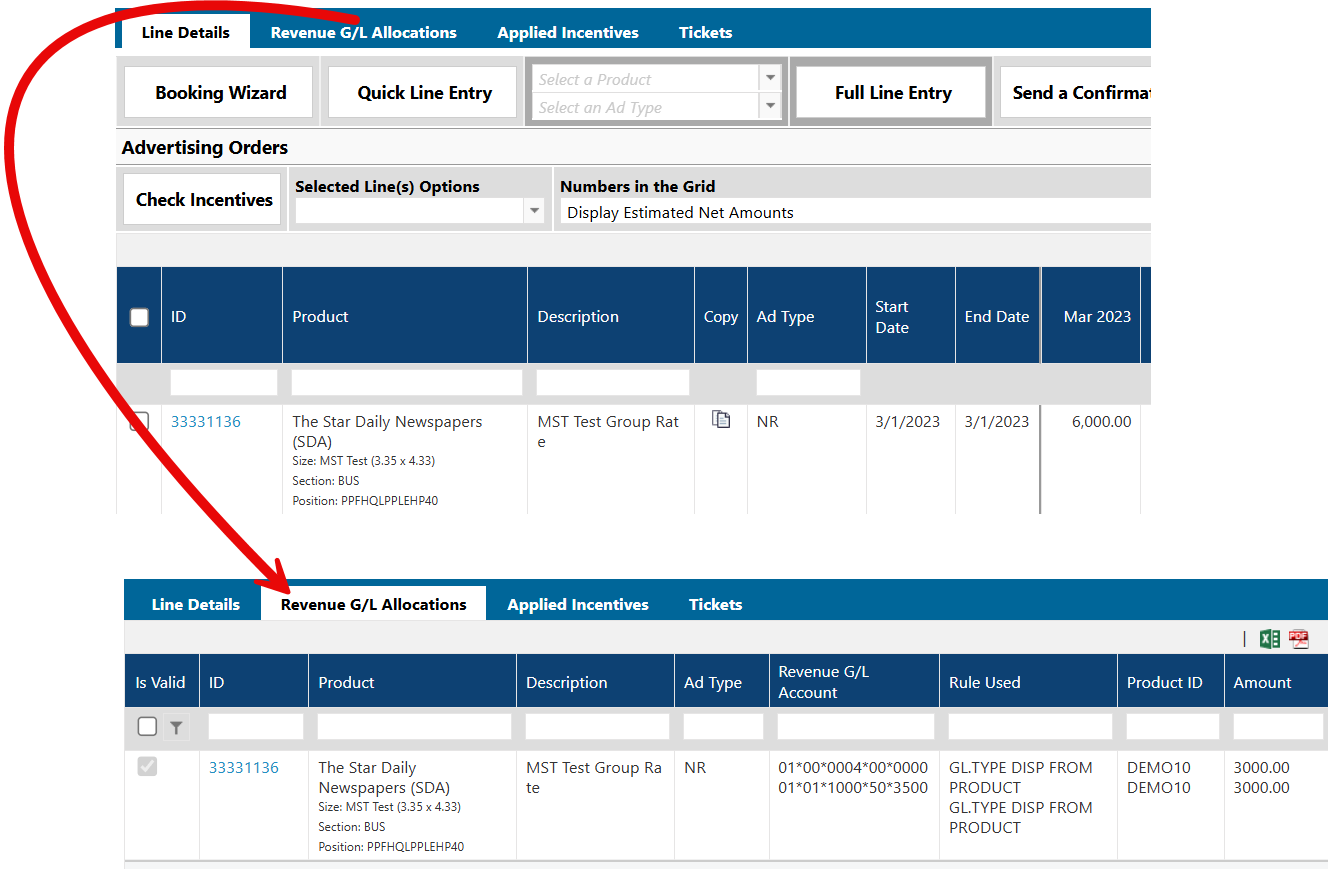
The Informer fields mentioned above will have the values from the "Revenue G/L Allocations" tab, however, this tab aggregates all sub orders that are on a line.
For example if a line ran for 3 months, hence 3 sub orders, each of $100. The Allocation would show 300 split across the GLs.
This report will take the aggregated GL Allocation and apply it to each sub order.
Let's walk through a scenario.
Scenario Details
Context:
- Campaign ID: 22572
- Line ID: 70176
- Sub Orders: Multiple sub-orders each with an
actAmountof$200, combining to reach a total campaign amount of$5,200(26 sub-orders total).
Revenue Distribution:
- GL Codes:
['001', '002'](made these up to keep it simple) - GL Amounts:
[2600, 2600](Total:$5,200)
Commission Distribution:
- GL Comm Codes:
['400', '500'](made these up to keep it simple) - GL Comm Amounts:
[-1300, -1300](Total:-$2,600)
Mathematical Breakdown for a Single Sub-Order
For a single sub-order where actAmount = 200:
1. Revenue Spread
- Total GL Amount:
2600 + 2600 = 5200 - Allocation: Each GL code represents
2600 / 5200 = 50%of the total. - Result: The
$200is split50/50.- GL
001:$100 - GL
002:$100
- GL
2. Commission Spread
- Total Commission Amount:
-1300 + -1300 = -2600 - Commission Percentage:
-2600 / 5200 = -50% - Commission for this actAmount:
200 * -50% = -100 - Allocation: Each commission GL code represents
-1300 / -2600 = 50%of the commission pool. - Result: The
-$100commission is split50/50.- GL
400:-$50 - GL
500:-$50
- GL
Informer Use
In Informer, we will call these functions (see below implementation) and will be return an array of sub order GL Amounts/GL Codes and GL Comm Amount/GL Comm Codes proportionally split from the aggregation GL Amount fields.
NOTE: The GL Amounts for each sub order will be GROSS, i.e. inclusive of the GL Commission amount
These arrays will need to then be normalized.
JavaScript Implementation
Below are the two functions required to process this logic. Both functions include "penny rounding protection" on the final array element to ensure no fractional cents are lost or gained during complex splits. All this means is that as we loop through and split the revenue across the GLs we are subtracting each interaction value from the total amount. Then on the last item in the array, instead of calculating (actAmt*proportion), we just return what is left from the total amount that we started with.
/**
 * Spreads a single actAmount proportionally across Revenue GL codes.
 */
function spreadProportionally(actAmt, glRevAmounts, glCodes) {
  const totalGlAmount = glRevAmounts.reduce((sum, amt) => sum + amt, 0);
  if (totalGlAmount === 0) throw new Error("Total GL amount cannot be zero.");

  let remainingActAmt = actAmt;
  const glSpreadAmts = [];

  glRevAmounts.forEach((glAmt, index) => {
    if (index === glRevAmounts.length - 1) {
      glSpreadAmts.push(Number(remainingActAmt.toFixed(2)));
    } else {
      const proportion = glAmt / totalGlAmount;
      const allocatedAmt = Number((actAmt * proportion).toFixed(2));
      glSpreadAmts.push(allocatedAmt);
      remainingActAmt -= allocatedAmt;
    }
  });

  return { glCodes, glSpreadAmts };
}

/**
 * Calculates the commission amount from an actAmount and spreads it across Commission GL codes.
 */
function spreadCommission(actAmt, glAmounts, glCommAmounts, glCommCodes) {
  const totalGlAmount = glAmounts.reduce((sum, amt) => sum + amt, 0);
  const totalGlCommAmount = glCommAmounts.reduce((sum, amt) => sum + amt, 0);

  if (totalGlAmount === 0) throw new Error("Total GL amount cannot be zero.");

  const commPercentage = totalGlCommAmount / totalGlAmount;
  const actCommAmt = Number((actAmt * commPercentage).toFixed(2));

  const glCommSpreadAmts = [];

  if (totalGlCommAmount === 0 || actCommAmt === 0) {
    return { glCommCodes, glCommSpreadAmts: glCommCodes.map(() => 0) };
  }

  let remainingCommAmt = actCommAmt;

  glCommAmounts.forEach((commAmt, index) => {
    if (index === glCommAmounts.length - 1) {
      glCommSpreadAmts.push(Number(remainingCommAmt.toFixed(2)));
    } else {
      const proportion = commAmt / totalGlCommAmount;
      const allocatedAmt = Number((actCommAmt * proportion).toFixed(2));
      glCommSpreadAmts.push(allocatedAmt);
      remainingCommAmt -= allocatedAmt;
    }
  });

  return { glCommCodes, glCommSpreadAmts };
}
Description
GL Revenue based report that uses the GL Rev Amount, GL Rev Codes and other fields to show the actual GL breakouts based on your Naviga setup (https://dev.navigahub.com/EW/devdigital/ad/setup/digital_setup)
Fields
| Label | Alias | Type | Hidden | Description |
|---|---|---|---|---|
| Campaign ID | campaignId | double | Campaign Identifier | |
| Line ID | id | keyword_text | Line Identifier | |
| Month Start Date | monthStartDate | date | Month start date is the starting date for the sub order on a line. Lines can have one or more sub orders. For print ads, this is synonymous with Issue Date. | |
| Product ID | webSiteId | keyword_text | Product Id | |
| Product | web_site_id_assoc_webPubName | keyword_text | Product Name/description | |
| Proportion Gl Amounts | proportionGLAmounts | double | Sub Order GL Gross Amount. | |
| Proportion Gl Codes | proportionGLCodes | keyword_text | Sub order GL Code | |
| Proportion Gl Comm Codes | proportionGLCommCodes | keyword_text | Sub Order Agency Commission GL Codes | |
| Proportion Gl Comm Amounts | proportionGLCommAmounts | double | Sub Order Agency Commission GL Amounts | |
| Proportional Spread | proportionalSpread | object | (hidden) Used in calculating final GL Rev Amt values | |
| Proportion Gl Source | proportionGLSource | keyword_text | GL Rev Source rule | |
| Proportion Gl Comm Source | proportionGLCommSource | keyword_text | GL Comm Source rule | |
| Gross Line Local Revenue | grossLineLocalRevenue | double | (hidden) calculated Gross line local revenue used in calculating the proper split of the GL Rev Amt and the GL Comm Amt for each sub order | |
| Proportional Comm Spread | proportionalCommSpread | object | (hidden) Used in calculating final GL Comm Amt values | |
| GL Line ID | glLineId | keyword_text | Added for testing/debugging, same as Line ID, but different granularity | |
| GL Comm Amt | glCommAmt | double | (hidden) This is a MV/SV field that contains the breakouts of the total agency commission Line amount across the defined GLs. | |
| GL Comm Codes | glCommCodes | keyword_text | (hidden) This is a MV/SV field that aligns with the GL Comm Amt to show the GL Code associated with the agency commission amount | |
| GL Rev Codes | glRevCodes | keyword_text | (hidden) This is a MV/SV field that aligns with the GL RevAmt to show the GL Code associated with the gross amount | |
| GL Rev Amt | glRevAmt | double | (hidden) This is a MV/SV field that contains the breakouts of the total gross Line amount across the defined GLs. | |
| Month Actual Amt | monthActualAmt | double | (hidden) used in calculating the proper split of the GL Rev Amt and the GL Comm Amt for each sub order | |
| Month Est Amt | monthEstAmt | double | (hidden) used in calculating the proper split of the GL Rev Amt and the GL Comm Amt for each sub order | |
| AD Internet Campaigns Internet Campaign Type | a_d_internet_campaigns_assoc_campaignType | keyword_text | Type of campaign M = Performance F = Flexible | |
| GL Comm Source | glCommSource | keyword_text | (hidden) The rules that the GL Comm Split is using | |
| GL Rev Source | glRevSource | keyword_text | (hidden) The rules that the GL Split is using |