NAVIGA-AD Internet Orders Starter
Type: Campaigns
Basic campaign revenue report with Sales Reps
Basic campaign revenue report with Sales Reps
Bundle (TGZ): NAVIGA-AD Internet Orders Starter
Definition JSON: naviga-ad-internet-orders-starter.json
Summary
This is a great report to use as a template when you need to get revenue reporting for your campaigns. There are a lot of Revenue fields and it is good to understand the difference, because you will not need all of them.
Local vs Foreign
All revenue fields with Local in their name reference your local/default currency. This field will also convert any campaigns that were booked in a foreign currency into your local currency at the exchange logged when the campaign was entered.
All revenue fields with "foreign" in their name will exist if that campaign was booked in a foreign currency. If the campaign was not booked in a foreign currency, this field will have the local currency amount. You can think of the foreign currency field as always aligning with the currency that the campaign was booked in. This means that you cannot aggregate/sum up the foreign currency field with grouping or filtering to a specific Currency Code. This is because the foreign currency fields will have different currencies in them.
Net vs Gross
You will see revenue fields with either Net or Gross in their field names. Net is net of Agency Commission (if any) and Gross will include Agency commission (if any).
Est and Act fields
You will also see revenue fields that include Est and Act in their field names. These are left in the report for your debugging convenience. To see how these fields are used to calculate the Gross Amount fields see Amount Fields Doc
Rep Revenue
You will also find Net Rep Local and Net Rep Foreign Revenue fields. If you have Rep in your output chart, make sure to use the Rep revenue field. This is because you could have multiple reps splitting the revenue on an order and that is what the Rep revenue fields do for you. For more information see the Rep Revenue Docs
Saved Functions used
To calculate the Revenue Amounts it uses the calculateLineAmounts saved function. To calculate the Rep Revenue Amounts it uses the calculateRepAmounts saved function.
Adding Fields to this Report
You can add fields to augment the data in the report, but you do need to be aware of certain steps if you add certain Multivalued fields.
-
Month prefixed fields - If you add any field from AD Internet Orders with the prefix of Month, like MONTH.START.DATE, you will need to make sure that you also add that field to the FIRST normalize flow step.
-
Line Detail Level Amount Fields - Since this started report is calculating Rep Revenue amounts, we need to take special steps to make sure to not overstate Line Detail Revenue. For example, if you had two reps on an order, each getting 50%, then that line would become two separate lines. The second Flow step includes ANY Revenue field that we do NOT want duplicated across multiple reps. So, if you add a value field that you are going to aggregate, make sure to add it to the second Flow step.
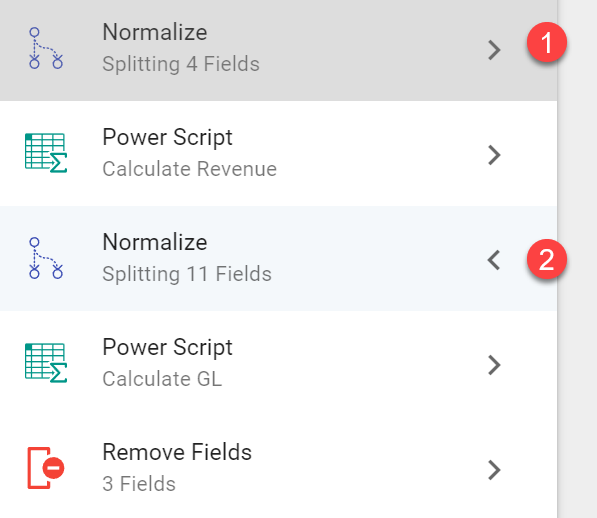
Description
Revenue report based on the AD Internet Orders mapping. It will also split revenue by Current Rep percentage if there are multiple reps assigned to an order. Similar output to Order by Product report from Naviga Ad.
Fields
| Label | Alias | Type | Hidden | Description |
|---|---|---|---|---|
| Campaign ID | campaignId | keyword_text | Campaign Identifier | |
| Line ID | id | keyword_text | Line Identifier. Campaigns will have multiple lines and lines will have multiple line details | |
| Advertiser Id | a_d_internet_campaigns_assoc_advId | keyword_text | ||
| Advertiser Name | a_d_internet_campaigns_assoc_advName | keyword_text | ||
| Ad Type ID | adTypeId | keyword_text | ||
| Current Rep ID | currentRepIds | keyword_text | Current Rep Identifier | |
| Cur Rep Name | curr_ad_salesreps_assoc_repName | keyword_text | Current Rep Name | |
| Current Rep Pct | currentRepPcts | double | Current Rep Percentage. There can be multiple reps on an order with each earning a different percent of the order towards commission. | |
| Month Actual Amt | monthActualAmt | double | Used to calculate the Net/Gross amounts | |
| Month Est Amt | monthEstAmt | double | Used to calculate the Net/Gross amounts. | |
| Month Start Date | monthStartDate | date | The starting date of the Order details record. | |
| Month End Date | monthEndDate | date | The ending date of the Order details record. | |
| Product ID | webSiteId | keyword_text | Product Identifier For a digital ad, this can be considered a Web Site ID. The location of the detail is in the AD Publications mapping. | |
| Product | web_site_id_assoc_webPubName | keyword_text | Product Name | |
| Print Pub Ind | web_site_id_assoc_printPubInd | keyword_text | Y = Print publication N = Digital Publication | |
| Campaign Date Entered | a_d_internet_campaigns_assoc_dateEntered | date | Date that the campaign was entered into the system. | |
| Campaign Type | a_d_internet_campaigns_assoc_campaignType | keyword_text | M = Performance Campaign F = Flexible Campaign | |
| Campaign Status Code | a_d_internet_campaigns_assoc_statusCode | keyword_text | Only these status' are included in results IS = Invoice Started CO = Confirmed R* = Reserved (can have multiple codes R1, R2, etc) | |
| Gross Line Local Amount | grossLineLocalAmount | double | Total Gross Revenue (including Agency Commission) in local currency | |
| Gross Line Foreign Amount | grossLineForeignAmount | double | Total Gross Foreign Revenue (including Agency Commission) in foreign currency | |
| Net Line Local Amount | netLineLocalAmount | double | Total Net Revenue (excluding Agency Commission) in local currency | |
| Net Line Foreign Amount | netLineForeignAmount | double | Total Net Foreign Revenue (excluding Agency Commission) in foreign currency | |
| Net Rep Local Amount | netRepLocalAmount | double | Total Net Revenue (excluding Agency Commission) in local currency and multiplied by the rep percentage | |
| Net Rep Foreign Amount | netRepForeignAmount | double | Total Net Foreign Revenue (excluding Agency Commission) in foreign currency and multiplied by the rep percentage | |
| Campaign Desc | a_d_internet_campaigns_assoc_campaignDescConv | keyword_text | ||
| GL Type ID | glTypeId | keyword_text | ||
| Advertiser Type ID | a_d_internet_campaigns_assoc_advertiser_id_assoc_clientTypeId | keyword_text | ||
| Agency Commission Percent | a_d_internet_campaigns_assoc_commissionPct | double | Used to calculate Net and Gross Revenue. Indicates the agency commission percent | |
| Currency Code | a_d_internet_campaigns_assoc_currCode | keyword_text | What the foreign currency code is. | |
| Currency Exchange Rate | a_d_internet_campaigns_assoc_currRate | double | Exchange rate for the foreign currency stored on the AD Internet Campaign mapping. | |
| No Agy Comm Ind | noAgyCommInd | keyword_text | Can be considered the Issue date for a Print publication. The starting date of the Order details record. |