NAVIGA-Client Brand Reps
Type: Clients
Brand focused client report.
NAVIGA-Client Brand Reps Downloads
Brand focused client report.
Bundle (TGZ): NAVIGA-Client Brand Reps
Definition JSON: naviga-client-brand-reps.json
Summary
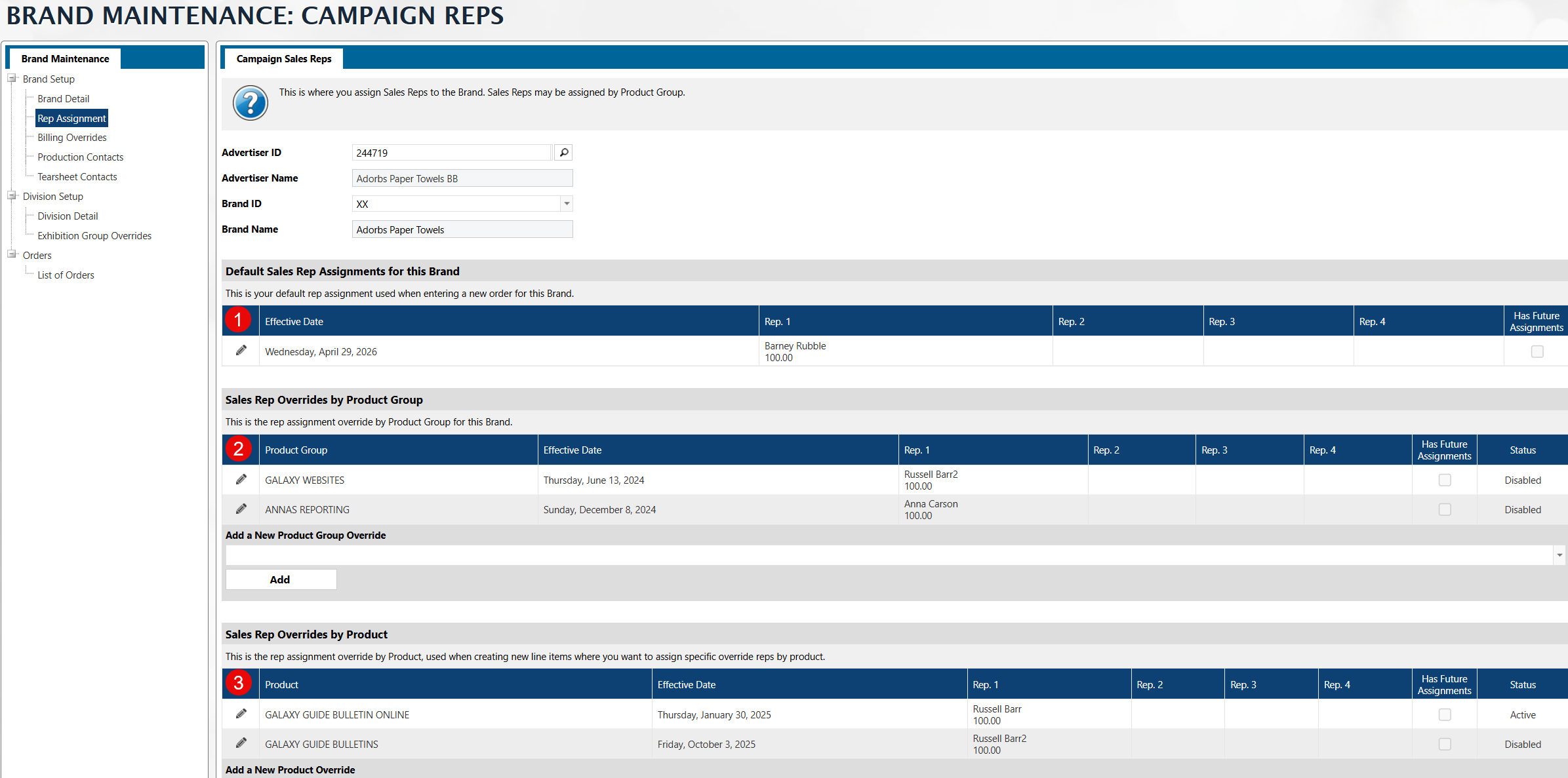
This is a useful dataset if you want to see a list of your Advertisers and their Brands. In addition to their brands, it will also show you the following Brand Rep and Rep overrides.
- Default Brand Rep - There can be up to four, but this report only shows the first one.
- Product Group Override Rep - Overrides by product group, again only the first of four is shown.
- Product Override Rep - Overrides by product, again only the first of four is shown.
Description
Pulls in the Advertiser Brands and the associated Brand Reps -> Default, Product and Product Group based reps. It defaults to only bringing in the first rep of each, however, you can easily update the Brand Rep dataset joins to bring in the other 3 reps for each group. NOTE: Each set of Brand Reps (Default, Product, Product Group) can have up to 4 reps defined.
Fields
| Label | Alias | Type | Hidden | Description |
|---|---|---|---|---|
| Advertiser ID | clientId | keyword_text | Client ID from AD Brands mapping | |
| Brand ID | brandCode | keyword_text | Brand Identifier | |
| Brand Name | brandName | keyword_text | ||
| Brand Product Rep Key | brandProductRepKey | keyword_text | Calculated Brand Key for Joins ClientIDBrandIDProductId | |
| Brand Product Group Key | brandRepKey | keyword_text | Calculated Brand Key for Joins ClientIDBrandIDProductGroupId | |
| Advertiser Name Id | advertiser_assoc_nameId | double | Name ID from GEN Clients | |
| Calced Brand Key | calcedBrandKey | keyword_text | Calculated Brand Key for Joins ClientID*BrandID | |
| Default Assign In Oe | defaultAssignInOE | keyword_text | Brand Default Reps Assign in OE setting. If this is "Y" then all reps are assigned in Order Entry | |
| Default Inactive Ind | defaultInactiveInd | keyword_text | Indicates this set of reps is disabled | |
| Default Rep Group 1 | defaultRepGroup 1 | keyword_text | First Default Rep Group. There can be up to 4. We just pull the first one | |
| Default Rep Id 1 | defaultRepId 1 | keyword_text | First Default Rep Id. There can be up to 4. We just pull the first one | |
| Default Rep Name 1 | defaultRepName 1 | keyword_text | First Default Rep Name. There can be up to 4. We just pull the first one | |
| Default Rep Pct 1 | defaultRepPct 1 | double | First Default Rep Pct. There can be up to 4. We just pull the first one | |
| Brand Product Assign In Oe | brandProductAssignInOE | keyword_text | Brand Product Reps Assign in OE setting. If this is "Y" then all reps are assigned in Order Entry | |
| Brand Product Inactive Ind | brandProductInactiveInd | keyword_text | Indicates this set of brand product reps is disabled | |
| Brand Product Rep Group 1 | brandProductRepGroup 1 | keyword_text | ||
| Brand Product Rep Id 1 | brandProductRepId 1 | keyword_text | ||
| Brand Product Rep Name 1 | brandProductRepName 1 | keyword_text | ||
| Brand Product Rep Pct 1 | brandProductRepPct 1 | double | ||
| Brand Product Group Inactive Ind | brandProductGroupInactiveInd | keyword_text | Brand Product Group Reps Assign in OE setting. If this is "Y" then all reps are assigned in Order Entry | |
| Brand Product Group Rep Group 1 | brandProductGroupRepGroup 1 | keyword_text | ||
| Brand Product Group Rep Id 1 | brandProductGroupRepId 1 | keyword_text | ||
| Brand Product Group Rep Name 1 | brandProductGroupRepName 1 | keyword_text | ||
| Brand Product Group Rep Pct 1 | brandProductGroupRepPct 1 | double |