NAVIGA-Dimensions Example
Type: Campaigns
This report shows how you are able to get the dimensions from different types of campaigns.
This report shows how you are able to get the dimensions from different types of campaigns.
Bundle (TGZ): NAVIGA-Dimensions Example
Definition JSON: naviga-dimensions-example.json
Summary
Depending on the type of campaign and line, the dimensions of the ad could be found in different places. This sample report shows how to pull data from multiple places and then through a Powerscript, determine which pieces are the Width and the Height.
We are following the logic laid out here -> [Dimensions Docs]((../informer/informer-mappings-ad-internet-orders#digital-size---columns---inches)
Some Campaign Ads will have a Width and a Height, but the column information is stored elsewhere (AD Internet Layouts). There are two ways to get at this information. First, there is a field in this example called joinField. It is creating a join key from the Class Layout ID and the Final Width. You can then join this to the NAVIGA-AD Internet Layouts dataset to pull in the information.
While this works, it does require that you keep another dataset refreshed. A different way is to link directly to the AD Internet Layouts mapping. We currently do not have this relationship setup, so you can set it up yourself (or simply put a support ticket in).
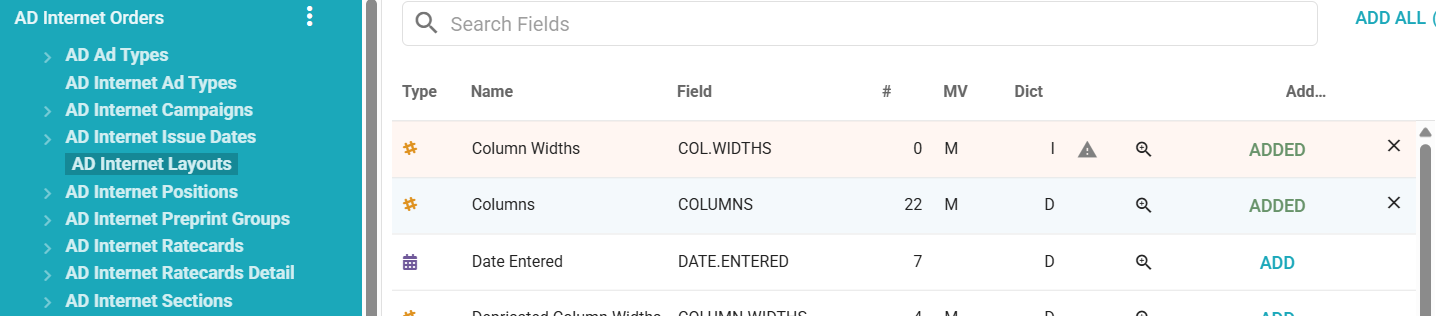
This is the link you would add to AD Internet Orders: [missing image: Pasted image 20261021145346.png]
You can then pull data from the related mapping. However, note that the Columns and Column Widths fields are both multi valued. This means that you will need a Powerscript to loop through the values and make a connection to the line in question to pull the correct Column value.
Contact support if you need help with this.
Description
This report shows how you are able to get the dimensions from different types of campaigns.
Fields
| Label | Alias | Type | Hidden | Description |
|---|---|---|---|---|
| Campaign ID | campaignId | double | Campaign Identifier | |
| Line ID | id | keyword_text | Line Identifier | |
| Final Width | finalWidth | double | Final Width value using the Powerscript to determine which fields to use | |
| Final Height | finalHeight | double | Final Height value using the Powerscript to determine which fields to use. | |
| Dimensions | dimensions | keyword_text | Used in determining where to get the Width and Height values. | |
| X Value | xValue | double | Can be the Width for certain types of campaigns | |
| Y Value | yValue | double | Can be the Height for certain types of campaigns | |
| ratecard Size Height | a_d_internet_ratecards_detail_assoc_a_d_internet_sizes_assoc_sizeHeight | double | Size Height field from AD Internet Sizes | |
| ratecard Size Width | a_d_internet_ratecards_detail_assoc_a_d_internet_sizes_assoc_sizeWidth | double | Size Width field from AD Internet Sizes | |
| AD Internet Sizes Size Height | a_d_internet_sizes_assoc_sizeHeight | double | Size Height field from AD Internet Sizes | |
| AD Internet Sizes Size Width | a_d_internet_sizes_assoc_sizeWidth | double | Size Width field from AD Internet Sizes | |
| AD Internet Sizes Dimension Type | a_d_internet_ratecards_detail_assoc_a_d_internet_sizes_assoc_dimensionType | keyword_text | ||
| AD Internet Ratecards Detail @ID | a_d_internet_ratecards_detail_assoc_id | keyword_text | ||
| Class Layout ID | classLayoutId | keyword_text | Layout ID linking to AD Internet Layouts | |
| Ad Publication Dflt Layout ID | web_site_id_assoc_dfltLayoutId | keyword_text | The AD Publications default Layout ID. It is used in the Join Field if the Class Layout ID in empty. | |
| Join Field | joinField | keyword_text | AD Internet Layouts has a column width field that is MV. This join field is construction to join with the NAVIGA-Ad Internet Layouts Dataset if you need to bring in Columns. NOTE: See docs for a different way to do this. |
Criteria
- All of
- Campaign ID equals INPUT 🧩Campaign ID
- Line Cancel Status ID does not match DE
🧩 Inputs
| Prompt | Type | Detail |
|---|---|---|
| Campaign ID | Multiple values |
Flow
| # | Step | Detail |
|---|---|---|
| 1 | Script: Combine dimensions sources to final fields | Looks through all size sources and determines which one to use for the finalHeight and finalWidth calculated fields |
| 2 | Script: Create Layout Join Field | Create a join key to be used to join to the NAVIGA-Ad Internet Layouts mapping We are NOT joining it in this example report, but we are building the link for your use if needed. |